SOC 2 compliance is essential for US businesses handling customer data. In today’s digital landscape, proving you can protect sensitive information isn’t just a “nice-to-have”; it is a requirement for closing deals with enterprise clients. However, navigating the requirements can feel overwhelming.
You might be looking for a simple checklist to hand to your IT team. Here is the hard truth :- No universal checklist exists. Unlike other frameworks, SOC 2 is unique. The American Institute of Certified Public Accountants (AICPA) provides criteria, but you must design specific controls tailored to your organization’s unique risks and technology. Businesses preparing for a SOC 2 audit can also find local compliance support in Los Angeles.
Therefore, we have compiled this guide based on the AICPA framework and industry best practices. We will provide a “channel partner perspective” on what enterprises actually require, offering a clear roadmap from assessment to implementation.
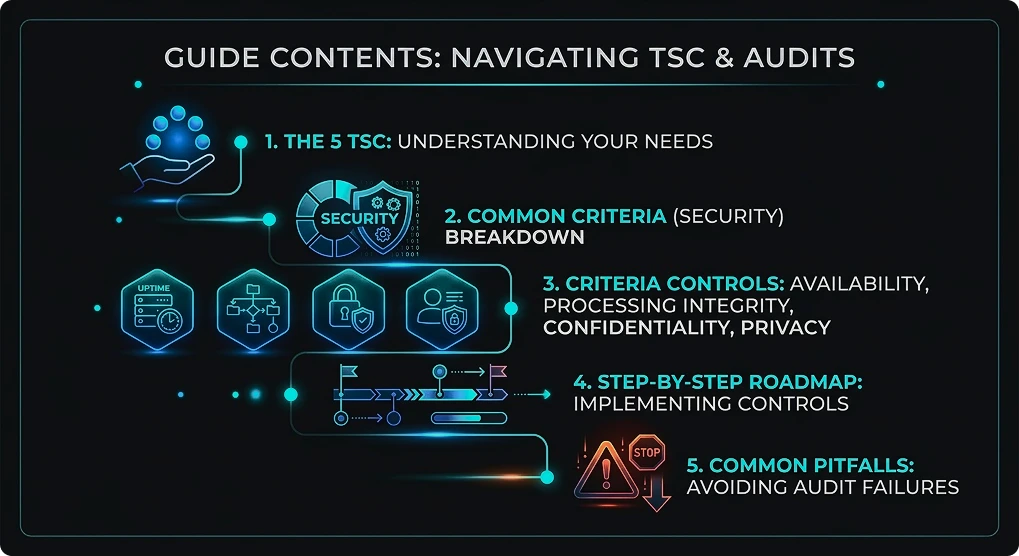
Our experts help you implement controls and pass audits with confidence.
What Are SOC 2 Controls?
SOC 2 controls are the policies, procedures, and technical measures your organization implements to protect customer data. These controls must align with the Trust Services Criteria (TSC) defined by the AICPA.
Think of the TSC as the “exam questions” and your controls as the “answers.” An independent auditor will test your controls to determine if they effectively meet the criteria. Consequently, a startup with five employees will have different controls than a multinational corporation, even if they are answering the same criteria.
Understanding the 5 Trust Services Criteria (TSC)
Before diving into the controls, you must select your scope. There are five categories, but only one is mandatory for every SOC 2 audit.
| Criteria | Focus Area | Mandatory? |
|---|---|---|
| Security (Common Criteria) | Protection against unauthorized access, damage, or disclosure. | Yes |
| Availability | System uptime and operational performance. | Optional |
| Processing Integrity | System processing is complete, valid, accurate, timely, and authorized. | Optional |
| Confidentiality | Protection of information designated as confidential (e.g., trade secrets). | Optional |
| Privacy | Protection of personal information (PII) like health or credit data. | Optional |
We define the right scope based on your business and customer requirements.
Complete SOC 2 Security Controls List
The Security criteria form the core of your audit. These are often called the Common Criteria (CC). Almost every SOC 2 report covers these nine categories.
CC1 - Control Environment
This part tests your company culture. You must prove that your bosses care deeply about safety.
- Code of Conduct: Set strict moral rules. Every team member must sign this each year. This proves they know their safety duties.
- Board Oversight: Form a safety steering team. This group needs to meet four times a year. They look at issues, pass new rules, and keep the company on track.
- Org Chart: Keep a fresh chart of all staff roles. This shows who reports to whom. It makes sure everyone knows who owns safety tasks and choices.
- Background Checks: Check every new hire before their first day. Look at their past jobs and criminal records. This stops high-risk people from joining your team.
CC2 - Communication and Information
How do you share important safety news?
- Internal Communication: Use Slack or email to share safety news. Hold regular team meetings. Keep your staff updated about new risks and rule shifts.
- External Communication: Build a safe way for guests to report bugs. Use a special email like [email protected]. This lets people warn you about flaws safely.
- Whistleblower Policy: Let workers report bad acts in secret. This rule helps staff speak up about poor choices. It ensures they can share issues without fear of losing their jobs.
CC3 - Risk Assessment
You cannot stop risks you do not know about. You must find the threats to your business.
- Annual Risk Assessment: Do a formal risk check once a year. Spot likely threats to your company. Look for web attacks, scams, or bad weather events.
- Fraud Risk Assessment: Think about how bad guys could trick your setup. Check the risk of staff doing wrong things. Look for plots that could steal cash or data.
- Risk Registry: Keep one big list of all threats. This file tracks every single risk. It lists the possible harm and the steps you take to fix it.
CC4 - Monitoring Activities
Rules fail if nobody checks them. You need ways to watch your safety steps.
- Ongoing Evaluations: Test your safety steps on a routine basis. Plan to check user access four times a year. This helps you prove your safety tools work right and follow your rules.
- Deficiency Reporting: Make a clear way to report broken rules. When you find a hole, write it down right away. Give a strict due date for your team to fix the issue.
CC5 - Control Activities
This group covers your formal rules and steps.
- Policy Updates: Safety rules shift all the time. Read your rules at least once a year. Change them to cover new tech, new risks, and company shifts.
- Inventory Management: Keep a very clear list of all gear and apps. You cannot guard what you do not track. Write down every laptop, server, and software license you buy.
CC6 - Logical and Physical Access Controls
This is a huge deal for software companies. It focuses tightly on keeping hackers out.
- Multi-Factor Authentication (MFA): Force MFA for all system logins. This adds a crucial wall of defense. A stolen password is not enough for a hacker to get in.
- Role-Based Access Control (RBAC): Limit entry based on job titles. Workers should only open files they need to do their exact jobs. This shrinks the harm of a bad breach.
- Access Provisioning: Use help tickets for new account needs. Write down who said yes to the access and why. This leaves a clear paper trail for every single new user.
- Offboarding: Take away access the day a worker leaves. You must cut off logins and badges within a day. This stops old staff from walking right back into your systems.
- Physical Security: Guard your office doors with strong walls. Use badge readers and lock your server rooms. Make guests sign in so you know who is walking around.
- Encryption: Mix up your data to make it look like junk. You must mix customer data when it sits on a drive. You must also mix it up while it flies across the web.
CC7 - System Operations
This part makes sure your systems run fast and safe.
- Vulnerability Scanning: Run auto safety checks four times a year. These tools read your code to find soft spots. They help you fix flaws before hackers can use them.
- Penetration Testing: Hire good hackers once a year. They will strike your system to test your walls. This gives you a true report on how to build better safety.
- Incident Response Plan: Make a plan for data leaks. Write down very clear steps for your team. Practice this plan often to make sure you move fast in a crisis.
- Backups: Keep your business safe from lost data. Set up daily, auto saves of your best data. Test the rebuild process to ensure you can bounce back from a crash.
CC8 - Change Management
Bad code shifts can break your whole setup. This rule ensures all updates are safe.
- Change Control Policy: Do not change code without a clear yes. Demand a formal okay for every single update. Make sure no unchecked changes ever hit your live product.
- Testing: Quality checks are an absolute must. All code must pass through a test zone first. Look for bugs and safety flaws before you push code to live users.
- Separation of Environments: Keep your tech networks far apart. Clear lines stop bad mistakes. Make sure that bugs in the test zone do not crash your live service.
CC9 - Risk Mitigation
You must handle risks that come from your business partners.
- Vendor Management: You are on the hook for your partners. Check your key vendors once a year. Read their SOC 2 reports to ensure they keep your data safe.
- Business Insurance: Get strong money protection. Keep a cyber risk insurance plan active. This pays for legal bills and fix-up costs if a data leak happens.
We implement SOC 2-ready security systems tailored to your infrastructure.
Availability Controls (A1 Series)
If your clients rely on your uptime (e.g., a cloud hosting provider), you should include these controls.
- Performance Monitoring :-
Monitor system health constantly. Use automated tools to track CPU, memory, and disk usage, ensuring your infrastructure stays healthy and alerting your team before a slowdown affects your customers.
- Capacity Planning :-
Predict your future growth accurately. Analyze current usage trends to forecast resource needs, ensuring you add server capacity well before traffic spikes cause system crashes or performance degradation.
- Disaster Recovery Plan (DRP) :-
Prepare for the worst-case scenario. Maintain a comprehensive, tested plan that outlines exactly how your team will recover operations and restore data following a catastrophic event or system failure.
- Offsite Backups :-
Store data far from home. Replicate your critical backups to a geographically distant location, ensuring that a physical disaster at your primary data center does not wipe out your records.
Processing Integrity Controls (PI Series)
These controls are vital for transaction-heavy businesses, like fintech or payroll processors.
- Input Validation :-
Stop bad data at the door. Configure your systems to automatically reject incorrect file formats or invalid values, preventing corrupt data from entering your database and causing processing errors later.
- Processing Logs :-
Keep a detailed history trail. Record every step of the data processing lifecycle, allowing your team to trace transactions and confirm that all scheduled jobs completed successfully without interruption.
- Output Verification :-
Double-check your results for accuracy. Regularly reconcile your output reports against the original input data to verify that your system processed the information correctly and produced valid final results.
Confidentiality Controls (C Series)
Pick these if you hold secret ideas or private deals.
- Data Classification :-
Put a label on every file you own. Sort data into Public, Internal, or Secret. This ensures your workers know how to handle, share, and guard sensitive files based on their true worth.
- Non-Disclosure Agreements (NDAs) :-
Tie staff and partners to legal rules. Force workers and outside helpers to sign an NDA. This stops them from giving trade secrets or private details to a rival.
- Secure Deletion :-
Smash old data so it is gone for good. Use digital shredders to wipe files clean when not needed. This ensures thrown-away details cannot be found by hackers later.
Privacy Controls (P Series)
This group is for personal details (PII). This is not the same as standard secret keeping.
- Privacy Notice :-
Be open with your users. Post a clear privacy rule on your site. It must tell users what data you take, why you need it, and how you use it.
- Consent Management :-
Ask for a yes before you track people. Get a strict, clear yes from users before taking private details. This keeps you in line with privacy laws like GDPR and CCPA.
- Data Subject Access Requests (DSAR) :-
Honor user data rights quickly. Build a simple way for clients to get a copy of their data or wipe it out. Reply within strict legal time frames.
- Privacy Training :-
Teach your team privacy rules. Hold special classes to train staff on touching personal data safely. Teach them to spot the risks of mishandling a user’s private details.
How Many SOC 2 Controls Do You Need?
Owners often ask about the magic number. Usually, a normal SOC 2 Type II report for a tech company has between 80 and 120 controls.
Having more is not always better. A small group of well-run controls beats a huge list you ignore. Work closely with your checker to map controls wisely. This stops you from making pointless work for your tech team.
From gap analysis to audit readiness—we handle everything.
Implementing SOC 2 Controls: Step-by-Step Guide
Step 1 - Scope Definition and TSC Selection
Pick test goals wisely. Decide which rules matter most to your paying clients. Figure out if you need extra categories like Privacy or Uptime next to the Security rules.
Step 2 - Gap Analysis and Risk Assessment
Find your weak security spots. Do a deep check of current rules and tech tools. This helps you spot where your company falls short of AICPA standards.
Step 3 - Control Design and Selection
Build smart fixes for your weak spots. Design exact steps to fix the issues you found. For example, if you lack a process for people leaving, write a clear checklist for your HR team.
Step 4 - Control Implementation and Policy Publication
Put your plan into action. Turn on your new steps right away by rolling out tools like MFA. Encrypt company laptops, and post your official worker handbook for everyone to read.
Step 5 - Evidence Collection and Documentation
Prove you follow rules with hard data. Use auto tools to grab system logs and screen grabs. This proves you are actually doing the steps you promised to do during the audit time frame.
Step 6 - Testing and Validation
Check all the work before the real test. Run a fake, internal test to check your safety steps. Spot and fix any weak spots before the outside checker shows up to look at them.
Step 7 - Audit Preparation and Execution
Bring in outside experts. Hire a neutral CPA firm to review your proof. They will test your steps and hand you the final SOC 2 report that you can share safely with your clients.
SOC 2 Type I vs Type II Controls
Understanding the difference in reporting is crucial for your timeline.
- SOC 2 Type I
This is a snapshot. It assesses if your controls are designed correctly at a specific point in time. It is faster and cheaper.
- SOC 2 Type II
This covers a period (usually 3 to 12 months). It proves your controls operated effectively over time. This is what most enterprise customers demand.
Common SOC 2 Control Failures and How to Avoid Them
Even prepared companies can stumble. Here are the most frequent failures we see:
- Access Control Failures :-
The most common exception is failing to remove a terminated employee’s access immediately.
Fix :- Automate deprovisioning.
- Documentation Gaps :-
You followed the process but didn’t write it down. If there is no screenshot, it didn’t happen.
Fix :- Use compliance automation tools.
- Change Management Deficiencies :-
Pushing code to production without approval is a major red flag.
Fix :- Enforce pull request reviews in GitHub/GitLab.
- Monitoring Gaps :-
Installing an alert system but ignoring the notifications.
Fix :- Configure alerts to ticket your engineering team directly.
Identify gaps early and fix them before your auditor does.
Conclusion
SOC 2 compliance is not about ticking boxes—it’s about building a security-first culture that earns trust and drives business growth. As this guide shows, there is no one-size-fits-all controls list; success depends on aligning the Trust Services Criteria with your organization’s unique risks, systems, and customer expectations. By focusing on well-designed, properly documented, and consistently monitored controls, you can move beyond audit readiness to real operational strength. Whether you’re aiming for your first Type I report or maintaining a Type II certification, the key is consistency, clarity, and continuous improvement. Implement smart controls, avoid common pitfalls, and treat compliance as an ongoing process—this is how you turn SOC 2 from a requirement into a competitive advantage in 2026 and beyond.
Frequently Asked Questions
How many SOC 2 controls are required?
There is no fixed number. Most SaaS companies implement between 80 and 100 controls. The exact count depends on your specific business complexity and the audit scope you define.
What is the difference between SOC 1 and SOC 2 controls?
SOC 1 focuses strictly on financial reporting controls, ideal for payroll firms. SOC 2 focuses on data security, availability, and privacy, making it the standard for technology and SaaS companies.
Are all Trust Services Criteria mandatory?
No, they are not all required. Only the Security category (Common Criteria) is mandatory. You can optionally add Availability, Processing Integrity, Confidentiality, or Privacy based on your clients’ specific needs.
Is SOC 2 certification legally required?
No, SOC 2 is a voluntary standard, not a law. However, large enterprise clients often require it contractually before they will agree to share their sensitive customer data with your business.
How long does SOC 2 Type II take?
The audit observation period typically lasts between 3 and 12 months. When you add preparation time, the entire process usually takes 6 to 15 months to complete successfully.
What happens if you fail SOC 2 controls during audit?
You do not technically “fail.” Instead, the auditor lists “exceptions” in your report. Too many exceptions result in a “Qualified Opinion,” which may cause customers to reject your security compliance.
Can small businesses achieve SOC 2 compliance?
Yes, small businesses can definitely achieve compliance. You can streamline controls to fit your size; for instance, the CEO can approve changes directly rather than using a complex management committee.
How often do you need to renew SOC 2?
SOC 2 reports are valid for only 12 months. However, Type I reports are typically considered stale after 6–12 months (not a fixed 12), and technically, both report types are valid indefinitely unless controls change. To maintain compliance and trust with your clients, you must undergo a new audit every year to verify your ongoing security.
What evidence is needed for SOC 2 controls?
Auditors require tangible proof of your actions. This includes screenshots of settings, system log files, signed policy documents, personnel files, and completed tickets from tracking systems like Jira.
Do you need a security team to implement SOC 2 controls?
Not necessarily. Many startups assign a Compliance Officer, often the CTO, and use automation software. This combination allows you to manage controls effectively without hiring a full dedicated security team.