
A single repeated password can destroy a security budget that took years. Attackers frequently target people because human behavior can provide another route around technical security controls. Attackers know the common ways people compromise security; thus, they target individuals rather than systems. In 2025, the FBI's Internet Crime Complaint Center received over a million complaints, with phishing and spoofing being among the most common.
This trend shows why security cannot rely on software alone. Antivirus software and firewalls are helpful, but they cannot prevent a trusted user from sharing a login.
This guide discusses the most common ways people violate security, what each one looks like in the workplace, and the practices that help close the gap. Now let's begin.
The Short Answer
The most common ways people compromise security in 2026 include reusing passwords, clicking on suspicious links, storing passwords insecurely, ignoring updates, using unsecured Wi-Fi, and handling company data on personal devices. CISA reports that 90% of cyberattacks start with phishing emails, and over $3 billion was lost to business email compromise in 2025. Using unique passwords, verifying links, securing networks, and enforcing device policies can significantly reduce these risks. The FBI’s Internet Crime Complaint Center recorded losses of $20.877 billion in 2025, highlighting the financial impact of human error in cybersecurity.
The Most Common Ways People Compromise Security
The majority of compromises begin with common practices rather than sophisticated hacking. Six of them repeatedly appear. Each one is simple to correct if you know where to search.
1. Reusing the Same Password Everywhere
One password used across several accounts multiplies a single leak into several. Attackers test the same email and password combinations on banking, email, and work apps when a shopping site loses its database. For this reason, CISA recommends creating strong, one-of-a-kind passwords for each account. Credentials that have been stolen continue to be one of the simplest ways in.
Employees repeat passwords because remembering several seems impossible. When someone duplicates a work login to a personal website, it creates a weak link. The corporation never notices the leak, but it pays for the consequences.
2. Clicking Links Without Checking Them
Phishing is on the top of the list of common security dangers. According to CISA, 90% of cyberattacks start with phishing email. The message can appear to be from a delivery service, a bank, or a boss.
A hasty click can direct a user to a phony login page or install malware. Before you act, take your time. Verify strange requests via a second channel, look at the sender address, and hover over the link. To rush the victim, attackers also employ social engineering via text and phone.
3. Storing Passwords Where Others Find Them
Sticky notes on monitors, shared spreadsheets, and files called "passwords" are still widespread. They can be read by anyone who opens a shared drive or passes a desk. A similar situation happens when someone shares a browser profile on a family laptop.
A password manager addresses this issue by storing unique passwords in an encrypted vault. Staff will remember one powerful passphrase rather than fifty poor ones.
4. Ignoring Security Warnings and Update Prompts
Many individuals keep clicking "remind me later" on update prompts for weeks. Delays in software updates expose known vulnerabilities, which attackers look for on a daily basis. They don't require a zero-day vulnerability because the patch from last quarter is still missing.
Browser cautions regarding hazardous websites receive the same consideration. When a warning appears, pause and ask why. Clicking through often leads consumers to a fraudulent page.
5. Working on Unsecured Public Wi-Fi
Cafés, airports, and hotels are convenient, but they also provide an entry point for attackers. On an open network, an attacker can try to intercept traffic between a person and a website. HTTPS blocks most of this, but unencrypted connections and fake login pages still leave users exposed.
False hotspots worsen the situation. Someone at the adjacent booth might have a network named after the café. For any task that requires access to company systems, use a company VPN or a phone hotspot.
6. Handling Company Data on Personal Devices
Personal devices frequently lack disk encryption, endpoint protection, and regular upgrades. One piece of malicious software on a phone can leak files and work emails. A misplaced tablet without a screen lock can expose client records.
Most of these issues can be resolved with a clear bring-your-own-device policy. Use mobile device management to keep business and personal data separate, and mandate screen locks and encryption.
What a Security Compromise Actually Means
A security breach occurs when an unauthorized entity gains access to a system, account, or piece of data. The attacker does not need to steal anything yet. Simply having access is sufficient. When someone else controls the keys, the organization loses control.
Compromise Versus a Full Data Breach
A data compromise can involve unauthorized access, exposure, theft, alteration, or destruction of information. A data breach generally refers to unauthorized access to or disclosure of protected data, although exact definitions vary by legal and cybersecurity framework.
Missing one comes at a high cost. In 2025, the FBI's Internet Crime Complaint Center recorded losses of $20.877 billion, a 26% increase over the previous year. Over $3 billion of that amount came from business email compromise alone.
Accidental Mistakes Versus Deliberate Insider Acts
Not every insider threat has the appearance of a villain. Anyone with authorized access who has the potential to intentionally or unintentionally cause harm to the business is considered an insider threat under CISA. The two groups require distinct types of defenses.
Negligent Insiders and Simple Errors
Negligent insiders do not intend to cause harm. They accept a fraudulent invoice, misplace a laptop, or transmit a file to the incorrect person. This is how human error in cybersecurity operates, and it manifests itself in incident after incident.
Blame is rarely helpful in this situation. Easy reporting channels, double-checking payment steps, and clear processes accomplish more. People who fear punishment are more likely to hide their mistakes.
Malicious Insiders and Stolen Access
Malicious insiders act on purpose. A frustrated administrator may erase files, or a departing employee may copy client lists. Others sell outsiders access.
Stolen access adds an unexpected element. When an attacker uses a legitimate employee's credentials, the behavior appears to be normal. Strong access control and activity recording might help you identify the difference. Alerts for strange hours, giant downloads, and new locations provide early warning.
Credential Attacks That Exploit These Habits
Bad behaviors turn into attack fuel. Automated tools can test large numbers of passwords and stolen logins against many accounts quickly, so weak and reused passwords fail first. Here are credential attacks that exploit these habits.
1. Credential Stuffing and Password Spraying
Credential stuffing is the practice of using username and password pairs leaked from one breach to access other websites. It works because people tend to reuse passwords. Password spraying reverses the technique. To prevent lockouts, the attacker uses a few popular passwords, such as "Summer2026!" on a large number of accounts.
When it comes to multi-factor authentication and unique passwords, both attacks are unsuccessful. According to CISA, activating MFA greatly reduces the likelihood of a cyberattack.
2. Phishing Pages That Harvest Logins
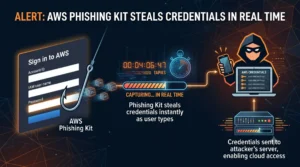
A phishing page mimics an authentic login screen. The attacker gathers the username and password that the victim enters. Some phishing kits can intercept and relay one-time MFA codes in real time.
Before you start typing, double-check the website address. Even better, make use of a password manager that won't fill in on a fake domain. Phishing-resistant authentication methods, such as FIDO security keys and passkeys, provide stronger protection by cryptographically binding authentication to the legitimate website.
Oversharing That Hands Attackers the Details
Before attacking, attackers investigate their objectives. Your team's internet posts serve as their screenplay. So here are a few things people do that provide data and details to the attackers.
Company Information Posted Publicly
Criminals can craft persuasive communications with the use of organizational charts, job titles, and vendor names on public profiles. A background image of a whiteboard or a credential can disclose more information than the poster is mindful of. A fraudster can use even a post that says "we just switched to a new billing tool" as a hook.
Request that employees consider their posts before posting about their jobs. Basic rules are more effective than outright prohibitions.
Shadow IT and Unapproved App Downloads
Shadow IT refers to tools that staff members use without IT's consent. If a team finds that the official sharing app is slow, they may switch to a free one. After that, the data sits outside corporate control, so IT may not be able to confirm how it is stored, who can access it, or whether it can be recovered or deleted.
Unapproved downloads may also include viruses. Provide a list of authorized tools and a quick approval process. People turn to shadow IT when the official method takes too long.
Configuration Gaps People Leave Behind
There are security flaws that don't even require a click. They originate from settings that have not been modified or examined.
Default Settings Never Changed
Misconfiguration can be as simple as a router's default admin password. Another common example is accidentally configured public cloud storage. Attackers are constantly searching the internet for these holes.
During setup, modify each default credential. Then, since updates might silently reset settings, verify cloud and SaaS settings on a regular basis.
Access Rights That Outlive the Role
When workers switch jobs, their access frequently remains the same. Accounts from former contractors remain active. Over time, a user can accumulate access rights far beyond what their current role requires.
When a role expires, apply least privilege and take away access. Conduct quarterly access reviews. Each unnecessary active account creates another potential entry point if its credentials are compromised.
Habits That Close These Gaps Fastest
Fixing everything at once is not necessary. Two practices can reduce several common security risks. Here are these two.
Password Managers and Multi-Factor Authentication
Creating unique passwords is simple with a password manager. MFA can prevent many account-takeover attempts that rely only on a stolen password. Both are advised by CISA, along with strong, one-of-a-kind passwords created by a manager. Start with admin, banking, and email accounts, then grow from there.
Patching and Update Discipline
Turn on automatic software updates wherever possible. For systems that need testing, set a fixed patch window and stick to it. Track which devices fall behind, especially laptops that rarely connect to the office.
Many common security compromises begin with ordinary mistakes rather than sophisticated attacks. A reused password, a rushed click, an unpatched laptop, or an old account that was never disabled can provide attackers with an opportunity. Attackers count on these habits because they work, and they work at scale.
Final Thoughts
The good news is that there is a workable solution for each gap. Password managers and multi-factor authentication substantially reduce the risk of many credential-based attacks. Frequent updates fix known vulnerabilities. Strict access control restricts the reach of a single stolen login. Add clear reporting procedures that encourage employees to disclose mistakes quickly, allowing security teams to respond before the impact grows.
All of this is maintained through security awareness training. Use recurring security-awareness training rather than relying solely on a single annual session.
At Defend My Business, we link companies with the identity, endpoint, and awareness training partners that bridge these common gaps. Are you ready to improve the habits of your team? Discover the ideal partner by speaking with our experts right now.
Frequently Asked Questions
What is a compromise in security?
Any situation in which an unauthorized person has access to a system, account, or data is considered a security compromise. It doesn't need stolen information. The concern is that the attacker can move, monitor, or steal once he gains access.
What are some of the most common ways people compromise security?
Phishing, weak or reused passwords, poor access controls, delayed patching, and unsafe handling of sensitive information are among the most common human-related security risks.
Is password reuse really that risky?
Indeed. If the same password is reused across multiple accounts, one compromised password can put all of those accounts at risk. The attack requires very little work because credential stuffing tools automatically test leaked pairs. The risk is reduced with unique passwords kept in a password manager.
How do accidental insiders differ from malicious ones?
Accidental insiders can harm by making blunders, such as sending a misdirected email or losing a laptop. Malicious insiders intentionally steal, sabotage, or sell access. The first group is addressed via training and well-defined procedures. Monitoring and access restrictions deal with the second.
Does public Wi-Fi still pose a real risk?
Yes, although widespread HTTPS encryption has significantly reduced some of the risks associated with public Wi-Fi. Users can still face risks from rogue hotspots, phishing pages, insecure applications, and other network-based attacks. For any business session, a VPN or a phone hotspot provides safer solutions.
What should someone do right after a mistake?
Report it immediately. If credentials may have been exposed, change the affected password and sign out of active sessions. Inform IT of the incident so they can look for indications of a broader compromise. Rapid reporting and response can significantly reduce the potential impact of an incident.
Want help getting your security solution right?
Defend My Business helps SMBs cut through the marketing and get their security solution right for their environment, budget, and compliance needs — then deploy and manage it. Through our 400+ vendor network we can often secure better pricing and terms than buying direct, and we stay vendor-neutral, so the recommendation fits you, not a sales quota. Want a second opinion? Pair this with our cybersecurity consulting or talk it through with an advisor.
Book a free call with a DMB advisor →